
Last Updated: May 2026
The Razer Ornata and Cynosa lines represent Razer’s budget and mid-range keyboard offerings — both membrane-based alternatives to their pricier mechanical keyboards. If you want the Razer brand experience without spending $100+, these are the keyboards to consider. But there are meaningful differences between them, and one important update for 2026: the Cynosa V2 has been discontinued by Razer. Here’s everything you need to know.
Quick Verdict
Choose the Ornata V3 if you want the better overall keyboard — mecha-membrane switches, included wrist rest, better sound dampening, and superior typing feel at a modest price premium.
Choose the Cynosa V2 if you find it at a discounted clearance price and just need a basic, reliable membrane gaming keyboard on a tight budget.
Important 2026 Update — Cynosa V2 Discontinuation
Razer discontinued the Cynosa V2 in 2024. It’s no longer being produced but units remain available through third-party sellers and sometimes at clearance prices. If you’re buying new, the Ornata V3 is the current active product in this category. The Cynosa V2 is still worth considering if you find it significantly discounted — it’s a solid keyboard — but for a new purchase at similar prices the Ornata V3 is the clear choice.
Side-by-Side Specs
| Feature | Razer Ornata V3 | Razer Cynosa V2 |
|---|---|---|
| Switch type | Mecha-membrane hybrid | Membrane |
| Form factor | Full-size | Full-size |
| Per-key RGB | Yes | Yes |
| Wrist rest | Yes (included, leatherette) | No |
| Sound dampening | Yes | No |
| Spill resistant | Yes | Yes |
| Anti-ghosting | 10-key rollover | 10-key rollover |
| Cable | Braided USB-A | Non-braided USB-A |
| Software | Razer Synapse 3 | Razer Synapse 3 |
| Status | Active | Discontinued |
| Price | ~$60–80 | ~$40–60 (while available) |
Switch Type — The Key Difference
This is the most important difference between the two keyboards.
The Ornata V3 uses Razer’s mecha-membrane switches — a hybrid design that combines a membrane base with a mechanical-style keycap and stem. This gives the keys a tactile mid-point click that feels noticeably more satisfying than a pure membrane keyboard. The actuation is more defined, the feedback is clearer, and the overall typing experience is closer to a mechanical keyboard than a standard membrane. For gamers who want some tactile response but find full mechanical keyboards too loud or too expensive, the Ornata hits a useful middle ground.
The Cynosa V2 uses a standard membrane design — softer, quieter, and with less tactile feedback. It’s the same type of switch found in most office keyboards. Perfectly functional for gaming and typing but noticeably less responsive feeling than the Ornata’s mecha-membrane.
Winner: Ornata V3 — meaningfully better switch feel
Build Quality and Comfort
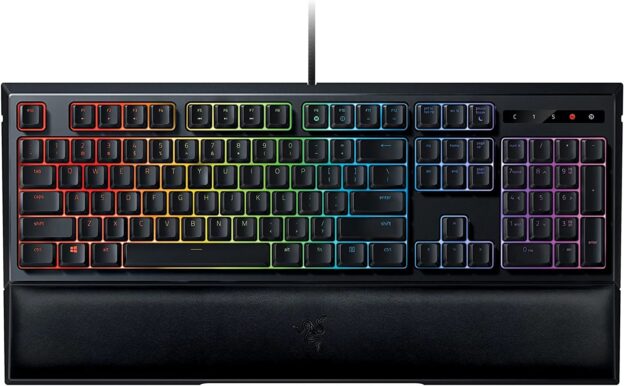
The Ornata V3 includes a magnetic leatherette wrist rest, which is a significant comfort advantage for long gaming or typing sessions. The wrist rest attaches magnetically so it’s easy to attach and remove. For players who game for multiple hours at a time, wrist support makes a real difference in comfort.
The Ornata V3 also features sound dampening foam inside the case — this absorbs some of the sound from keypresses, making it quieter than you’d expect for a mecha-membrane keyboard. The Cynosa V2 has no sound dampening.
Both keyboards are spill resistant, which is a practical feature for desk setups. The Ornata V3 uses a braided cable which is more durable and tangle-resistant than the Cynosa V2’s standard cable.
Winner: Ornata V3 across the board
RGB Lighting
Both keyboards feature per-key Razer Chroma RGB lighting, fully customizable through Razer Synapse 3. Both support Razer’s LIGHTSYNC technology for syncing lighting effects with other Razer peripherals and compatible games. The lighting quality is essentially identical on both keyboards.
Winner: Tie
Software
Both keyboards are fully supported by Razer Synapse 3 for lighting customization, macro programming, and profile management. Synapse 3 requires a Razer account for full features. The software experience is identical across both keyboards.
Winner: Tie
Gaming Performance
Both keyboards feature 10-key rollover with anti-ghosting — meaning up to 10 simultaneous keypresses are registered accurately. For gaming this is more than sufficient. The mecha-membrane switches in the Ornata give slightly more defined actuation feedback which some competitive players prefer for knowing exactly when a keypress registers.
Neither keyboard is aimed at the most competitive gaming market — for that, Razer’s Huntsman and BlackWidow lines with faster optical or mechanical switches are more appropriate. For casual to intermediate gaming both are perfectly capable.
Winner: Ornata V3 marginally for switch feedback
Price and Value
The Ornata V3 at $60–80 costs $15–20 more than the Cynosa V2 typically sold for. Given the meaningful advantages — mecha-membrane switches, wrist rest, sound dampening, braided cable — that premium is well justified. The Ornata V3 is genuinely good value for what it delivers.
The Cynosa V2 is worth picking up at clearance prices below $40 if budget is tight. At similar prices to the Ornata V3, the Ornata is the better buy.
Winner: Ornata V3 for value
What Gamers Say
Both keyboards have strong reputations. The Ornata V3 has consistently high ratings on Amazon, with users praising the mecha-membrane feel, wrist rest comfort, and overall build quality. The most common praise is that it feels significantly more premium than its price suggests.
The Cynosa V2 before discontinuation was similarly well-rated, with users highlighting its value for money and reliable performance. The most common criticism was the lack of wrist rest and the basic membrane feel compared to more expensive keyboards.
Which Should You Buy?
The answer in 2026 is straightforward — buy the Ornata V3. It’s the current active product, it’s a meaningfully better keyboard in every measurable way, and the price difference is modest. The mecha-membrane switches, wrist rest, and sound dampening alone justify the extra $15–20 over the discontinued Cynosa V2.
The only scenario where the Cynosa V2 makes sense is if you find it at a significantly discounted clearance price — say $25–30 — and need a basic keyboard on an extremely tight budget.
Frequently Asked Questions
Is the Razer Ornata good for typing?
Yes — the mecha-membrane switches provide tactile feedback that makes typing more satisfying than a standard membrane keyboard. The included wrist rest adds comfort for long typing sessions. It’s a solid dual-purpose gaming and office keyboard.
Is the Ornata V3 a mechanical keyboard?
Not technically — it uses mecha-membrane switches which are a hybrid between membrane and mechanical. It has the tactile bump and click feel of a mechanical keyboard but uses a membrane base rather than individual mechanical switch housings. This makes it quieter and less expensive than a full mechanical keyboard.
What replaced the Cynosa V2?
Razer discontinued the Cynosa line without a direct successor. The Ornata V3 is now Razer’s entry-level gaming keyboard offering. If you’re looking for a cheaper alternative, third-party brands like Redragon offer solid budget mechanical keyboards at similar price points.
Can I still buy the Cynosa V2?
As of 2026 it’s no longer produced but may be available through third-party sellers while stocks last. Check Amazon and other retailers for availability.hat the Ornata offers, then you’ll be more than happy with your purchase.
Do you have experience with either of these keyboards? If so, let me know what you think in the comments! Also, if you enjoyed this post, you may also enjoy our recent post on the best budget keyboards under $100.