
Last Updated: May 2026
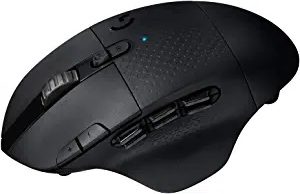
The Logitech G604 and G502 Hero are two of Logitech’s most feature-packed gaming mice — both designed for right-handed palm grip players who want maximum programmable buttons and premium sensor performance. They’re aimed at similar buyers but with one fundamental difference in how they connect. This guide breaks down everything you need to know to pick the right one.
Quick Verdict
Choose the G502 Hero if you want the best value, adjustable weights, and don’t need wireless connectivity.
Choose the G604 if you want wireless freedom, significantly more programmable buttons (15 vs 11), and dual wireless modes for both gaming and productivity.
Side-by-Side Specs
| Feature | Logitech G604 | Logitech G502 Hero |
|---|---|---|
| Sensor | HERO 16K | HERO 25K |
| Max DPI | 16,000 | 25,600 |
| Buttons | 15 programmable | 11 programmable |
| Connection | LIGHTSPEED wireless + Bluetooth | Wired USB |
| Battery | 240 hours (1x AA) | N/A |
| Weight | 135g | 121g (adjustable) |
| Adjustable weights | No | Yes (up to 27g) |
| RGB | No | Yes (2 zones) |
| Software | Logitech G HUB | Logitech G HUB |
| Price | ~$60–80 | ~$40–50 |
Sensor Performance
The G502 Hero uses Logitech’s HERO 25K sensor — one of the most accurate gaming sensors available, with a 25,600 DPI range and essentially flawless tracking performance. It’s the same sensor found in Logitech’s most premium mice.
The G604 uses the older HERO 16K sensor — still accurate and reliable for gaming, but with a lower maximum DPI ceiling and slightly older technology than the 25K. For the vast majority of gaming scenarios the difference is imperceptible, but the G502 has the technically superior sensor.
Winner: G502 Hero
Buttons and Programmability
This is where the G604 stands out clearly. With 15 programmable buttons versus the G502’s 11, the G604 is one of the most button-rich gaming mice available without crossing into dedicated MMO mouse territory (like the 12-button side grid on mice like the Razer Naga).
The G604’s extra buttons are particularly valuable for MMO and MOBA players who benefit from having abilities, items, and macros on mouse buttons. The six thumb buttons make it especially capable for complex games. For FPS gaming 11 buttons on the G502 is more than sufficient.
Winner: G604 for button count, G502 for FPS simplicity
Connectivity
The G604 supports two wireless modes — LIGHTSPEED 2.4GHz (1ms gaming-grade wireless) and Bluetooth (for productivity use on laptops or mobile devices without the USB dongle). This dual-mode wireless makes the G604 an excellent choice for players who also use their mouse for work — swap between LIGHTSPEED for gaming and Bluetooth for your laptop without changing any hardware.
The G502 Hero is wired only. No battery concerns, no dongle required, slightly lower latency on paper (though indistinguishable in practice from LIGHTSPEED).
Winner: G604 for wireless versatility
Battery Life
The G604 runs on a single AA battery and delivers up to 240 hours — roughly 10 days of gaming before needing a replacement. This is exceptionally long battery life for a wireless gaming mouse. A fresh AA is available at any convenience store, eliminating the anxiety of a rechargeable battery running out mid-session.
Winner: G604 — 240 hours on a AA is outstanding
Weight and Feel
The G502 Hero at 121g with adjustable weights up to 148g suits palm grip players who prefer a heavier, more substantial mouse. The weight system lets you tune the balance precisely.
The G604 at 135g is heavier than the G502 at its base weight, which some players find slightly tiring during extended FPS sessions. It’s designed for palm grip and fits large hands well. The lack of weight adjustment means you get what you get.
Winner: G502 for weight customization
RGB Lighting
The G502 Hero has two RGB zones — logo and a DPI indicator strip — customizable through G HUB. The G604 has no RGB lighting at all. If aesthetics and lighting sync with your setup matter, the G502 wins by default.
Winner: G502 Hero
Price and Value
The G502 Hero at $40–50 is significantly cheaper than the G604 at $60–80 and delivers a better sensor at a lower price. For pure gaming value the G502 is the stronger choice.
The G604’s premium is justified by LIGHTSPEED wireless, Bluetooth dual-mode, and 15 programmable buttons. If those features matter to your use case, the extra $20–30 is reasonable.
Winner: G502 for value, G604 for wireless features per dollar
Who Should Buy Each Mouse?
Buy the G502 Hero if:
- You game primarily with a wired connection
- Value is a priority
- You want the better sensor and adjustable weights
- FPS or general gaming is your primary use case
Buy the G604 if:
- Wireless matters for your setup
- You play MMOs, MOBAs, or other games that benefit from many programmable buttons
- You want Bluetooth for dual use between gaming PC and laptop
- Battery longevity matters to you
Frequently Asked Questions
Is the G604 good for FPS gaming?
Yes — the HERO 16K sensor is accurate and the LIGHTSPEED wireless provides lag-free performance. At 135g it’s slightly heavier than ideal for competitive FPS but perfectly usable. Players who prefer a heavier mouse and want wireless will be happy with it.
Does the G604 work with Logitech POWERPLAY?
No — the G604 is not compatible with POWERPLAY wireless charging. It uses AA batteries rather than a rechargeable battery.
Is the G502 Hero being replaced?
The G502 X is the successor to the Hero with upgraded LIGHTFORCE switches and a lighter build. The Hero remains actively sold as the budget option. We covered the full G502 lineup in our G502 Hero vs Lightspeed comparison.
Can the G604 be used wired?
No — the G604 is wireless only. There is no wired mode. If you specifically need a wired connection, the G502 Hero is the right choice. is. But essentially, the bottom line is that they’re both really solid gaming mice.
Have you tried either of these mice? If so, please let me know what you think in the comments! Also, if you are still undecided on a gaming mouse, you may be interested in our recent comparison of the G502 vs the Razer Basilisk v3.