Category Archives: Hardware

Razer Ornata V3 vs Cynosa V2: Which Budget Razer Keyboard Should You Buy? (2026)

Last Updated: May 2026

The Razer Ornata and Cynosa lines represent Razer’s budget and mid-range keyboard offerings — both membrane-based alternatives to their pricier mechanical keyboards. If you want the Razer brand experience without spending $100+, these are the keyboards to consider. But there are meaningful differences between them, and one important update for 2026: the Cynosa V2 has been discontinued by Razer. Here’s everything you need to know.

Quick Verdict

Choose the Ornata V3 if you want the better overall keyboard — mecha-membrane switches, included wrist rest, better sound dampening, and superior typing feel at a modest price premium. read more

Is Gaming RAM Worth It Compared to Value RAM?

Whether you are upgrading an old computer or if you are building or just buying a brand new computer, you may wonder if it is worth buying high performance ram. Generally speaking, high performance memory claims to be faster and also claims to be able to handle higher temperatures, and for this you pay a higher price. However, is it really worth the extra money?

Performance RAM Speed

One claim by memory manufactures is that performance memory is faster. To a point, they are correct. In a recent study done by Tom’s Hardware, they found that, on average, performance memory was 1-3% faster than standard memory. They found cases in which the memory was even faster, but they also found cases in which the regular memory outperformed the higher performance memory. For me personally, if this was the only factor, a 1-3% gain is not worth the extra cost.

Heat Dissipation and Overclocking of Performance RAM

Another reason that you may opt for performance RAM is that you are attempting to overclock. In this case, the performance RAM shows its main benefit. In many tests conducted by users at tom’s hardware and overclockers.com, they have found that they are able to push a system with performance RAM to higher speeds and maintain stability. This is mainly due to the fact that performance RAM can handle and dissipate heat better than normal or value memory. So, if you thinking about overclocking, going with the performance memory may be worth it for you.

Now, this is not to say that you can’t overclock with normal memory. You can achieve very impressive overclocks with normal memory. However, if you are a minmaxer, then you may want to go with performance RAM.

Consider Pricing and User Reviews

If you are about to make this decision, you may want to look at the price difference and user reviews. During a recent sale, I was able to pick up some performance memory that was only 10% higher than the regular memory. At this price, it was worth it to me. By looking out for a deal, you may not have to pay much more for a higher quality product.

In this article, I am talking in generalities. Before making any purchases, I highly recommend that you read product reviews and research the product you are looking at buying. This will give you a good idea of the quality and reliability of the product you are purchasing.

Wrapping Up

The conclusion is pretty simple, if you have the money and want to go for extreme  overclocks, I would recommend a highly rated performance memory. However, if you have no intention of minmaxing your overclock or if you don’t plan to overclock at all, normal RAM or value-ram should be fine for you.

What do you think? Let me know in the comments!

#mc_embed_signup{background:#fff; clear:left; font:14px Helvetica,Arial,sans-serif; }
/* Add your own MailChimp form style overrides in your site stylesheet or in this style block.
We recommend moving this block and the preceding CSS link to the HEAD of your HTML file. */

Stay up to date with the Latest Tech Tips, Hardware Guides, and our Exclusive Giveaways!

(Don't worry, we won't spam you)

Best 40% Keyboards for Gaming

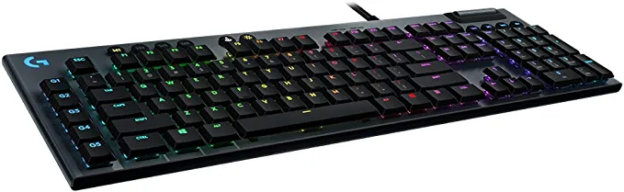
You might have heard of 40% keyboards on gaming forums, but do you know what they actually are? The clue is in the name — these unusually small keyboards come with only 40% (or thereabouts) of the number of keys of a regular keyboard. 

Now, you might be thinking that that’s an oddity that you could do without, but the truth is that these types of keyboards do offer some key advantages that other, fuller-size keyboards do not. In this blog, we’ll take a look at the benefits of 40% keyboards and give our recommendations on the best ones out there to buy, should you decide that it’s what you need to take your gaming performance to the next level.  read more

Best Full Tower ATX Cases Under $200 – December 2022

Picking the right case is crucial to any build, especially if you are building a gaming PC. Before you commit to a full size case, you will want to make sure you have plenty of room for your PC. If you are worried about space, you may be better off with a Mid size ATX case. There are a number of benefits of going with a full size case.

Benefits of a Full ATX Case

The first and most obvious benefit is that a full size ATX case gives you plenty of room for all the hardware you could possibly want. If you want an array of hard drives, you will have room. If you want to run multiple GPUs, you will also have room. With a full size case, you won’t be limited by the case on being able to run the setup of your choice. read more

6 Reasons Your Video Card Is Underperforming

Recently, I had to deal with an issue where a video card was underperforming. This was an odd issue and was really the first time I have seen this particular problem. I did quite a bit upfront research on this and it turns out there are multiple reasons why a video card may be running slow. Let’s get right into the causes and solutions for a video card that is not performing as expected.

Overheating Issue

This is one of the most common reasons why a video card may underperform. One last thing to check is if your video card is overheating. This is especially true if you have been using the same video card for awhile. After months or even years of use, the card gets dirty and dusty, and the thermal paste that helps dissipate the heat break down. Extreme overheating issues can cause blue screens and even damage to the card. However, even minor overheating can keep the card from running at maximum efficiency. If you believe this is the cause, cleaning the dust off your video card and reapplying thermal paste should help. As part of this, you may want to give your whole computer case a good cleaning if you can as that can make a big difference as well.

Driver Software Not Up To Date

Driver software for video cards is updated quite often. If your video card is underperforming, it is worth updating the driver software for your particular card. Even if this doesn’t fix the issue, having the latest drivers is beneficial for many reasons. I would recommend downloading the newest drivers directly from your video card manufacturer’s website. This is generally a pretty quick and easy task, so I would definitely try this first or second.

Video Card Clock Manually Set Below Standard

This is another not so obvious thing to look at. Nowadays, most video card driver software allows for you to lower the clock speeds below standard. Alternatively, the video card speeds can often be changed in the BIOS as well.  So, one of the first things to look at is whether or not the clock has been manually lowered in the BIOS or in the video card driver software.

Video Card Not Seated or Plugged in Correctly

This is another simple thing to check. If your card isn’t seated correctly or if it isn’t getting enough power, it could cause issues. Try re-seating your card. Also, while you are in your case, check to make sure that all power connections are properly connected and secure. Before opening up your computer case, make sure to shut down your PC and unplug the main power for safety reasons.

BIOS is not up to date

Another reason why the video card may be underperforming is that your BIOS is not up to date. If you have gotten to this part of the guide and your video card is still slow, you can try updating the BIOS as this may help fix this issue. Also, keeping your BIOS up to date can also help to fix other issues such as compatibility problems.

Virus or Malware

One more thing to check for is a virus or malware. It is pretty unlikely that virus would directly target your video card. However, if you have a virus, your whole PC could be underperforming. So, running a virus and malware scan can help your performance in general. Checking for malware is something you will want to do regularly with or without any performance issues.

Overall, there are a number of reasons why a video card may be underperforming. By checking the possible issues above, you should be able to get your card running at top speeds again.

#mc_embed_signup{background:#fff; clear:left; font:14px Helvetica,Arial,sans-serif; }
/* Add your own MailChimp form style overrides in your site stylesheet or in this style block.
We recommend moving this block and the preceding CSS link to the HEAD of your HTML file. */

Stay up to date with the Latest Tech Tips, Hardware Guides, and our Exclusive Giveaways!

(Don't worry, we won't spam you)