
Last Updated: May 2026
If you play games on a laptop, a cooling pad is one of the smartest accessories you can buy. Gaming pushes your CPU and GPU hard, generating significant heat — and laptops have far less thermal headroom than desktops. A good cooling pad can drop temperatures by 15–25°C, prevent thermal throttling, and extend the life of your hardware.
In this guide we cover the best laptop cooling pads for gaming in 2026, from budget picks under $30 to premium options for serious gamers.
Why Laptop Cooling Pads Matter for Gaming
When a laptop’s CPU or GPU hits its thermal limit, it automatically reduces clock speeds to cool down — a process called thermal throttling. This causes frame rate drops, stuttering, and sluggish performance, even on expensive hardware. A cooling pad addresses this by improving airflow beneath the chassis, keeping temperatures in the safer 70–80°C range during gaming instead of pushing toward the 90–95°C danger zone.
Beyond performance, lower temperatures mean less wear on your laptop’s fans, thermal paste, and internal components — protecting your investment over time.
Most gaming laptops draw air from vents on the bottom of the chassis. A cooling pad keeps those vents elevated and unobstructed, while adding extra airflow from below. If you game on a couch or on your lap, a cooling pad also makes the experience far more comfortable by keeping the heat off your legs.
What to Look for in a Gaming Laptop Cooling Pad
Fan size and design — Larger fans (190–200mm) move more air at lower RPMs, meaning better cooling with less noise. Smaller multi-fan designs can work well but tend to be noisier at higher speeds. Some premium pads use a sealed foam gasket that directs air directly into your laptop’s intake vents, which is significantly more effective than open designs.
Size compatibility — Make sure the pad supports your laptop’s screen size. Most pads support up to 15.6 or 17 inches — check before buying if you have a larger gaming laptop.
Adjustable height — An angled stand improves airflow and also makes for a better typing and viewing ergonomic position during long sessions.
USB passthrough — Most pads connect via USB and add one or more extra USB ports, which is handy since gaming laptops often run short on ports.
Best Laptop Cooling Pads for Gaming in 2026
Razer Laptop Cooling Pad — Best Overall
The Razer Laptop Cooling Pad is the top recommendation for serious gamers in 2026. It uses a large 200mm fan with a sealed airflow system that directs cool air directly into your laptop’s intake vents rather than just blowing air around the desk. This focused approach can reduce temperatures by up to 23°C. The adjustable height (3–9 inches) improves both airflow and ergonomics, and it includes five USB-A ports — generous for a cooling pad. It’s on the pricier end but it’s the most effective option available.
Best for: Gamers experiencing regular thermal throttling or running demanding AAA titles. Supports: Up to 17 inches Price: ~$80–100
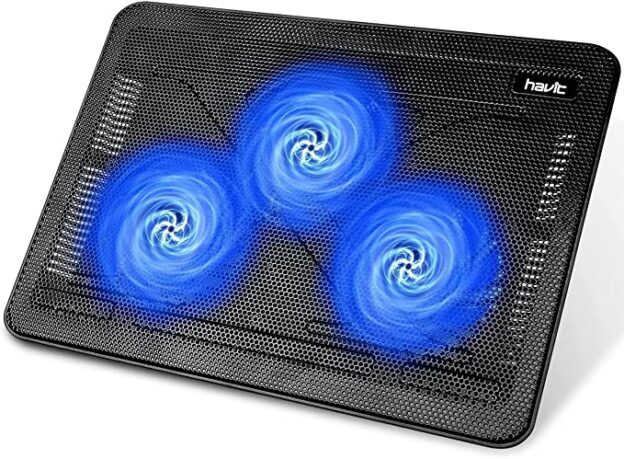
Havit HV-F2056 — Best Budget Pick
The Havit HV-F2056 has been one of the most popular budget cooling pads for years, and it still earns that reputation. It has three large ultra-quiet fans, doubles as a laptop stand, and supports up to 17-inch laptops. With over 35,000 Amazon reviews and a 4.5/5 rating it has an exceptional track record. At under $30 it’s the easiest recommendation for anyone who wants a solid, no-fuss cooling pad without spending much.
Best for: Budget-conscious gamers or casual use. Supports: Up to 17 inches Price: ~$25–30
llano V12 — Best Mid-Range
The llano V12 has emerged as one of the strongest mid-range options in 2026. It uses a large central turbo fan with a focused airflow design, RGB lighting, and a built-in USB hub. In testing it delivers temperature drops that rival more expensive options at roughly half the price of the Razer pad. The adjustable fan speed control lets you balance cooling power against noise depending on what you’re playing.
Best for: Gamers wanting strong cooling performance without the premium price tag. Supports: Up to 17 inches Price: ~$50–70
Kootek Laptop Cooling Pad — Best for Multiple Fan Coverage
If you prefer a traditional multi-fan design over a single large fan, the Kootek is the best option in that category. It has five quiet adjustable-speed fans that cover the entire base of the laptop evenly. In testing it delivers 10–15°C temperature reductions and the lowest fan speed setting is nearly inaudible. It’s also very affordable and widely available.
Best for: Gamers who prefer wide, even airflow coverage across the laptop base. Supports: Up to 17 inches Price: ~$30–40
Quick Comparison Table
| Cooling Pad | Fans | Max Size | Price | Best For |
|---|---|---|---|---|
| Razer Laptop Cooling Pad | 1x 200mm | 17″ | ~$90 | Best overall |
| Havit HV-F2056 | 3 fans | 17″ | ~$28 | Best budget |
| llano V12 | 1x large turbo | 17″ | ~$60 | Best mid-range |
| Kootek Cooling Pad | 5 fans | 17″ | ~$35 | Even coverage |
Do Laptop Cooling Pads Actually Work?
Yes — but results vary. For gaming laptops that are already running hot and experiencing thermal throttling, a quality cooling pad with a sealed or focused airflow design can make a meaningful difference to both temperatures and frame rate stability. For laptops that run cool already, the improvement will be less dramatic.
The key is airflow design. Pads that direct air into your laptop’s intake vents outperform flat pads that just circulate air around the desk. If your laptop overheats regularly, a sealed or turbo-fan design like the Razer or llano V12 will serve you better than a basic multi-fan pad.
Frequently Asked Questions
Will a cooling pad improve FPS?
Indirectly yes, if your laptop is thermal throttling. When CPUs and GPUs hit their thermal limits they reduce clock speeds, which causes frame drops and stuttering. A cooling pad that keeps temperatures lower prevents this throttling and maintains consistent performance. You won’t gain FPS beyond your laptop’s normal capability, but you’ll avoid losing it.
What size cooling pad do I need?
Match the pad to your laptop’s screen size. A 15.6-inch laptop needs at least a 15.6-inch pad; a 17-inch gaming laptop needs a 17-inch pad. Too small and the intake vents won’t be properly supported.
Can I use a cooling pad on a couch or on my lap?
Yes — that’s one of the main use cases. A cooling pad elevates the laptop off soft surfaces that would otherwise block the bottom vents, and keeps the heat off your legs during long sessions.
How much temperature reduction should I expect?
A quality cooling pad typically reduces temperatures by 10–25°C under gaming load. Budget flat pads tend to deliver 5–10°C. Sealed or turbo-fan designs targeting your laptop’s intake vents deliver 15–25°C reductions.
If you enjoyed this post, you may want to check out some of our other recently updated gaming peripheral guides such as the best budget gaming mice or the best budget gaming keyboards.