
Last Updated: May 2026
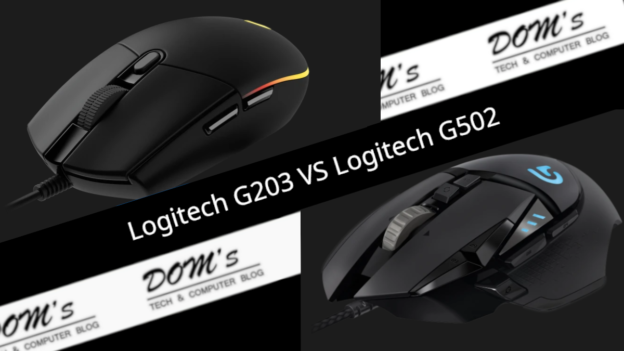
The Logitech G203 and G502 Hero are two of the most popular wired gaming mice available — both from Logitech, both with excellent reputations, but aimed at very different buyers. The G203 is one of the best budget gaming mice you can buy. The G502 Hero is a feature-packed premium option. This guide helps you figure out which one is right for you.
Quick Verdict
Choose the G203 if you’re on a tight budget, want a lightweight ambidextrous mouse, or are new to gaming mice.
Choose the G502 Hero if you want a feature-rich mouse with adjustable weights, 11 programmable buttons, and the best sensor Logitech offers at this price point.
Side-by-Side Specs
| Feature | Logitech G203 | Logitech G502 Hero |
|---|---|---|
| Sensor | Logitech optical | HERO 25K |
| Max DPI | 8,000 | 25,600 |
| Buttons | 6 programmable | 11 programmable |
| Weight | 85g | 121g (adjustable) |
| Adjustable weights | No | Yes (up to 27g) |
| Shape | Ambidextrous | Right-handed ergonomic |
| RGB | LIGHTSYNC RGB | LIGHTSYNC RGB (2 zones) |
| Connection | Wired USB | Wired USB |
| Software | Logitech G HUB | Logitech G HUB |
| Price | ~$20–25 | ~$40–50 |
Sensor Performance
The G502 Hero uses Logitech’s HERO 25K sensor — one of the best gaming sensors available at any price, with a 25,600 DPI range, zero smoothing, and essentially flawless tracking. It’s the same sensor technology found in Logitech’s most expensive mice.
The G203 uses a capable optical sensor that tops out at 8,000 DPI. It’s accurate and reliable for casual to intermediate gaming — more than sufficient for most players. However it doesn’t match the HERO 25K’s tracking precision at extreme DPI ranges or its consistency across all surfaces.
For casual gaming and everyday use the G203’s sensor is perfectly adequate. For competitive play where precise tracking matters, the HERO 25K is meaningfully better.
Winner: G502 Hero
Design and Ergonomics
The G203 uses a compact, ambidextrous design that works for both left and right-handed players. At 85g it’s lightweight and suits fingertip and claw grip players well. The shape is simple and clean — not flashy, just functional. It’s one of the better ambidextrous shapes at this price point.
The G502 Hero uses a large right-handed ergonomic design with a sculpted body, pronounced thumb scoop, and multiple thumb buttons. It’s designed specifically for palm grip and fits medium to large right hands well. At 121g with the option to add weight, it’s heavier than the G203 — which some players prefer for stability and others find fatiguing over time.
Winner: Personal preference — G203 for lightweight/ambidextrous, G502 for right-handed palm grip
Buttons and Programmability
The G502 Hero has 11 programmable buttons vs the G203’s 6. The extra buttons on the G502 include two thumb buttons, a DPI shift button, and dual-mode scroll wheel toggle — all useful for gaming shortcuts, macros, and in-game actions.
For casual gaming 6 buttons on the G203 is sufficient. For competitive gaming or complex titles like MMOs and MOBAs where extra bindings help, the G502’s 11 buttons provide a meaningful advantage.
Winner: G502 Hero
Weight System
The G502 Hero includes five removable 3.6g weights that let you tune the mouse from 121g down to 94g or up to 148g. This is a unique feature in this price range that lets you dial in the exact feel you prefer.
The G203 has no weight adjustment — you get what you get at 85g.
Winner: G502 Hero for customization, G203 for players who already prefer a light mouse
RGB Lighting
Both mice feature Logitech’s LIGHTSYNC RGB, customizable through G HUB. The G203 has per-key style lighting across the scroll wheel and logo. The G502 has two RGB zones. Both look good and sync with other Logitech peripherals. Neither has a clear edge here.
Winner: Tie
Price and Value
The G203 at $20–25 is one of the best value gaming mice available. For an entry-level or casual gamer it delivers solid performance, reliable build quality, and Logitech brand reliability at a price that’s hard to argue with.
The G502 Hero at $40–50 costs roughly twice as much but delivers significantly more — better sensor, more buttons, adjustable weights, and a more sophisticated ergonomic design. For serious gamers it represents excellent value at this price point.
Both are exceptional value for what they deliver in their respective categories.
Winner: G203 for budget value, G502 for features per dollar
What Gamers Say
The G203 has over 40,000 Amazon reviews at 4.7/5 — exceptional for a budget mouse. Users consistently praise the lightweight feel, accurate tracking, and value. It’s one of the highest-rated gaming mice at any price.
The G502 Hero has over 52,000 reviews at 4.7/5 — matching the G203’s rating despite costing twice as much, which is a strong signal of genuine quality. Users highlight the sensor accuracy, build quality, and feature set. It’s been a top recommendation from reviewers for years.
Which Should You Buy?
Buy the G203 if:
- Budget is the primary consideration
- You’re new to gaming mice or a casual gamer
- You prefer a lightweight ambidextrous mouse
- You’re left-handed
Buy the G502 Hero if:
- You’re a serious or competitive gamer
- You want the best sensor Logitech offers at this price
- More programmable buttons matter for your games
- You want adjustable weights to customize the feel
The G203 is the right answer for budget buyers and casual gamers. The G502 Hero is the right answer for anyone who games regularly and wants a mouse that will genuinely improve their experience. The price difference is real but so is the performance difference.
Frequently Asked Questions
Is the G203 good for competitive gaming?
Yes for casual to intermediate competitive play. The 8,000 DPI sensor is accurate enough for most scenarios and the lightweight 85g build suits fast FPS movements. Very serious competitive players will want the G502 Hero’s HERO 25K sensor for the best precision.
Is the G502 Hero too heavy for gaming?
At 121g base weight it’s heavier than the ultra-light mice (60–80g) popular in competitive FPS. Many players game with it successfully though. With weights removed it drops to around 94g which is more manageable for fast-paced play.
Does the G203 work on Mac?
Yes — the G203 is plug-and-play compatible with macOS. Full customization via G HUB requires the macOS version of G HUB software.
What’s the difference between the G203 and G203 LIGHTSYNC?
The G203 LIGHTSYNC is the current version with updated LIGHTSYNC RGB technology. It’s the same mouse with improved lighting. If buying new you’ll get the LIGHTSYNC version automatically.