
Last Updated: May 2026
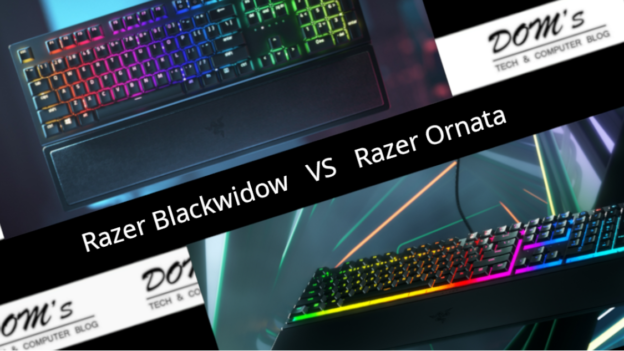
The Razer BlackWidow V4 and Razer Ornata V3 are two popular Razer gaming keyboards aimed at different types of buyers. The BlackWidow is a full mechanical keyboard for serious gamers. The Ornata is a mecha-membrane hybrid that sits between membrane and mechanical in feel and price. Understanding that difference makes the choice straightforward.
Quick Verdict
Choose the BlackWidow V4 if you want a true mechanical keyboard with the feel, durability, and performance that serious gaming demands.
Choose the Ornata V3 if you want a quiet, comfortable mecha-membrane keyboard at a lower price — particularly good for mixed gaming and office use.
Side-by-Side Specs
| Feature | Razer BlackWidow V4 | Razer Ornata V3 |
|---|---|---|
| Switch type | Razer Green or Yellow mechanical | Mecha-membrane hybrid |
| Actuation force | 45g (Green) / 35g (Yellow) | 45g |
| Keystroke feel | Tactile clicky or linear | Mid-point click, membrane base |
| Keycaps | ABS doubleshot | UV-coated ABS |
| Form factor | Full-size (114 keys) | Full-size |
| Dedicated macro keys | Yes (3 keys) | No |
| Media controls | Yes + dial | Yes (dedicated keys) |
| Wrist rest | Magnetic, leatherette | Magnetic, leatherette |
| Per-key RGB | Yes | Yes |
| Software | Razer Synapse 3 | Razer Synapse 3 |
| Price | ~$80–100 | ~$60–80 |
Switch Type — The Fundamental Difference
This is the most important thing to understand before choosing between these keyboards.
The BlackWidow V4 uses true mechanical switches — Razer Green (clicky, tactile, louder) or Razer Yellow (linear, quiet, smooth). Mechanical switches have individual housing for each keyswitch, physical metal contact points, and a distinct actuation feel. They’re more durable, more responsive, and generally preferred by serious gamers and typists. Rated for 80 million keypresses.
The Ornata V3 uses mecha-membrane switches — a hybrid design where the keycap and stem feel mechanical but the base is membrane-style. This gives a mid-point tactile click that’s more satisfying than a pure membrane keyboard but not quite as precise or responsive as true mechanical. It’s quieter than clicky mechanical and more affordable.
For competitive gaming the BlackWidow V4’s true mechanical switches are the better choice. For casual gaming and office use the Ornata V3’s mecha-membrane feel is perfectly capable and more comfortable for some typists.
Winner: BlackWidow V4 for gaming performance, Ornata V3 for quiet comfort
Build Quality
Both keyboards have aluminum top plates and feel solid and premium. The BlackWidow V4’s ABS doubleshot keycaps are more durable than the Ornata V3’s UV-coated ABS — doubleshot keycaps have legends molded through the entire keycap rather than printed on top, so they never fade or wear off regardless of how much you type.
Both include magnetic detachable leatherette wrist rests — comfortable for long sessions and a feature many competitors don’t offer at these price points.
The BlackWidow V4 adds three dedicated macro keys on the left side and a media control dial — features the Ornata V3 doesn’t have. These are genuinely useful for gamers who use macros and for streaming setups.
Winner: BlackWidow V4 for keycap durability and extra features
Typing and Gaming Feel
The BlackWidow V4 Green switches deliver the classic Razer clicky experience — loud, satisfying tactile feedback with a pronounced bump. Many gamers love this for the confirmation of every keypress. The Yellow switches offer a smooth, quiet linear feel that’s popular for gaming where rapid keypresses without noise are preferred.
The Ornata V3’s mecha-membrane feel is unique — softer than mechanical with a shorter, lighter keystroke. Some users find it more comfortable for long typing sessions precisely because it’s less fatiguing than mechanical. Others find it lacks the crispness of true mechanical switches.
Winner: Personal preference — BlackWidow V4 for traditional mechanical feel, Ornata V3 for softer touch
RGB Lighting
Both keyboards feature Razer Chroma per-key RGB with 16.8 million color options, fully customizable through Razer Synapse 3. Both support LIGHTSYNC dynamic lighting that reacts to games. The lighting quality is excellent on both. No meaningful difference here.
Winner: Tie
Software
Both keyboards are fully supported by Razer Synapse 3 for lighting, macro programming, and profile management. The experience is identical across both keyboards.
Winner: Tie
Price and Value
The Ornata V3 at $60–80 is the more affordable option. For casual gamers and office users who want a step up from a standard membrane keyboard without paying full mechanical prices, it represents good value.
The BlackWidow V4 at $80–100 is priced competitively for a full mechanical keyboard with this feature set — dedicated macro keys, media dial, doubleshot keycaps, and wrist rest. For serious gamers the modest price premium over the Ornata is well justified.
Winner: Ornata V3 for budget, BlackWidow V4 for features per dollar
What Gamers Say
The BlackWidow line has been one of Razer’s most popular keyboard series for years. The V4 in particular has received strong reviews for its build quality, switch feel, and added macro keys. Users frequently praise the media dial as a premium touch.
The Ornata V3 has solid ratings with users particularly praising its comfortable feel for long typing sessions and the magnetic wrist rest. The most common feedback is that it’s ideal for mixed gaming and productivity use.
Which Should You Buy?
Buy the BlackWidow V4 if:
- You want a true mechanical keyboard for gaming
- Dedicated macro keys and media dial are useful for your workflow
- Long-term keycap durability matters
- You’re a serious or competitive gamer
Buy the Ornata V3 if:
- Budget is a priority
- You prefer quieter, softer keystrokes
- You use the keyboard equally for gaming and typing/office work
- Mechanical switches feel too loud or stiff for your preference
Frequently Asked Questions
Is the Ornata V3 a mechanical keyboard?
No — it uses mecha-membrane switches which are a hybrid design. The keycap and stem feel mechanical but the base is membrane. It’s more responsive than a standard membrane keyboard but not a true mechanical. If you specifically want mechanical switches the BlackWidow V4 is the right choice.
Which BlackWidow V4 switch should I choose?
Green switches are louder with a tactile clicky bump — great if you want audible confirmation of keypresses and enjoy the classic mechanical feel. Yellow switches are quiet and linear — better for shared spaces or players who prefer smooth keypresses without noise. When in doubt Yellow is the more versatile choice.
Does the BlackWidow V4 work on console?
Both keyboards connect via USB and function as standard input devices on PS5 and Xbox. Synapse software features are PC-only but basic keyboard functionality works on consoles.
What’s the difference between the BlackWidow V4 and V4 Pro?
The V4 Pro adds LIGHTSPEED wireless connectivity. Otherwise the switches, build, and features are essentially the same. The Pro costs significantly more.pinion is the right choice for someone who just wants to use it for office work.
Do you use either of these keyboards? Let us know what you think in the comments!