
Last Updated: May 2026
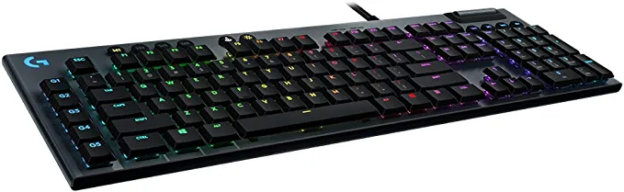
The Logitech G815 and G915 are two of the best low-profile gaming keyboards available. Both use Logitech’s GL mechanical switches in a sleek, slim design that works equally well for gaming and office use. The core difference is simple — the G815 is wired, the G915 is wireless. But there’s more to it than that, including switch options, pricing, and how the newer G915 X fits into the picture.
Quick Verdict
Choose the G815 if you want the same premium low-profile keyboard experience at a significantly lower price and don’t need wireless.
Choose the G915 if wireless freedom matters and you want the flexibility of both wireless and wired modes.
Choose the G915 X if you want the latest version with upgraded switches and extended battery life.
What Makes These Keyboards Special — Low-Profile Switches
Both keyboards use Logitech’s GL (GX Low Profile) mechanical switches — a distinctive low-profile design that sits roughly 35% shorter than traditional mechanical switches. This gives them a flatter, more laptop-like feel while still delivering the tactile response of a mechanical keyboard.
Three switch variants are available across both models:
GL Clicky — tactile bump with an audible click. Satisfying for typing, noticeable in quiet environments.
GL Tactile — tactile bump without the click. The most popular choice for mixed gaming and typing — responsive feedback without the noise.
GL Linear — smooth, quiet keystroke with no bump. Preferred by FPS gamers who want fast, uninterrupted keypresses.
Side-by-Side Specs
| Feature | G815 | G915 | G915 X |
|---|---|---|---|
| Switch type | GL Clicky/Tactile/Linear | GL Clicky/Tactile/Linear | GL Tactile/Linear |
| Connection | Wired USB | LIGHTSPEED wireless + USB | LIGHTSPEED wireless + USB-C |
| Battery life | N/A | ~30 hours (RGB on) | ~45 hours |
| Form factor | Full-size | Full-size | Full-size |
| Per-key RGB | Yes | Yes | Yes |
| Media controls | Yes (dedicated) | Yes (dedicated) | Yes (dedicated) |
| USB passthrough | Yes | No | No |
| Software | Logitech G HUB | Logitech G HUB | Logitech G HUB |
| Price | ~$100–130 | ~$150–200 | ~$180–230 |
Design and Build Quality
Both keyboards share the same striking brushed aluminum top plate design — thin, premium-looking, and genuinely durable. At 950g the G815 is slightly heavier than the G915 at 918g, though the difference is negligible in daily use. Both feel solid and high-quality on the desk.
The slim 22mm profile is one of the most distinctive things about both keyboards. They’re significantly lower than traditional mechanical keyboards, which some users find more comfortable for long typing sessions and which gives your desk setup a clean, modern look.
The G815 adds a USB-A passthrough port on the back — a useful feature for plugging in a mouse or USB drive without reaching around to your PC. The G915 drops this to accommodate the wireless hardware.
Winner: Tie on design, G815 for the USB passthrough
Wireless Performance (G915)
The G915 uses Logitech’s LIGHTSPEED wireless technology — the same 2.4GHz wireless found in Logitech’s top gaming mice, rated at 1ms response time. In practice the wireless connection is indistinguishable from wired for gaming. There is no perceptible input lag.
Battery life is approximately 30 hours with RGB lighting on, which is enough for most users to go several days between charges. With RGB off, battery life extends significantly. The keyboard charges via micro-USB while you continue using it.
The G915 X improves on this with USB-C charging and approximately 45 hours of battery life with RGB on — a meaningful improvement.
Gaming Performance
Both keyboards perform identically from a gaming standpoint — same switches, same polling rate, same anti-ghosting and N-key rollover support. The low-profile GL switches are well-suited to gaming, particularly the Linear variant for fast keypresses and the Tactile for players who want feedback confirmation.
The dedicated media controls (volume roller, mute button, playback controls) on both keyboards are a convenience feature that regular streamers and content creators will appreciate during gaming sessions.
Software — Logitech G HUB
Both keyboards are fully supported by Logitech G HUB, which handles per-key RGB customization, macro programming, onboard profile storage, and LIGHTSYNC (lighting sync with other Logitech peripherals). G HUB is one of the more capable peripheral software suites and works well for both keyboards.
Price and Value
The G815 typically sells for $100–130 — significantly cheaper than the G915 at $150–200. For the same switch quality, same build, and same typing experience, the G815 represents considerably better value if wireless isn’t a priority.
The G915 X sits at $180–230 at full price but the upgraded USB-C charging and extended battery life make it the better wireless option over the original G915 if you’re buying new.
Which Should You Buy?
Buy the G815 if:
- You want the premium low-profile keyboard experience at the best price
- Wireless isn’t important to your setup
- You want the USB passthrough port
- Budget is a consideration
Buy the G915 if:
- Wireless matters — for a cleaner desk, gaming from a distance, or flexibility
- You’re already in the Logitech LIGHTSPEED ecosystem
- You find the G915 at a good sale price
Buy the G915 X if:
- You want the latest version with USB-C and better battery life
- You’re buying new and willing to pay the premium
Frequently Asked Questions
Are the G815 and G915 good for typing as well as gaming?
Yes — both keyboards are excellent for typing. The low-profile switches and aluminum build make them particularly popular as dual-purpose gaming and office keyboards. The GL Tactile switch is generally the most recommended for mixed use.
Is the G915 wireless reliable for gaming?
Yes — LIGHTSPEED wireless operates at 1ms response time over 2.4GHz and is effectively indistinguishable from a wired connection during gaming. Logitech’s wireless technology is among the most reliable available.
What’s the difference between the G915 and G915 TKL?
The G915 TKL is a tenkeyless version that drops the numpad for a more compact layout. The switch options, wireless performance, and build quality are identical. Choose TKL if you want more desk space for mouse movement.
Do these keyboards have onboard memory?
Yes — both keyboards support onboard profile storage via Logitech G HUB, allowing you to save your settings directly to the keyboard and use them on any PC without installing software.
Have you tried either of these keyboards? If so, let me know what you think in the comments! Also, if you enjoyed this post, you may be interested in our recent post about the best keyboards under 100 dollars.