
Last Updated: May 2026
If you’re looking for a solid gaming keyboard without spending a fortune, the SteelSeries Apex 3 and the HyperX Alloy Core RGB are two of the most popular options in the budget segment. Both are membrane keyboards, both offer RGB lighting, and both come in under $50 — but there are some meaningful differences that could make one a much better fit for you than the other.
In this comparison we’ll break down everything you need to know: build quality, switches, features, performance, and value — so you can make the right call.

Quick Verdict
Choose the SteelSeries Apex 3 if: you want a wrist rest included, better water resistance, and a slight performance edge.
Choose the HyperX Alloy Core if: you want the most affordable option and don’t need the extras.
Side-by-Side Specs
| Feature | SteelSeries Apex 3 | HyperX Alloy Core RGB |
|---|---|---|
| Switch Type | Whisper-Quiet (membrane) | Soft-touch membrane |
| Form Factor | Full-size (104 keys) | Full-size (104 keys) |
| RGB Lighting | 10-zone RGB | 5-zone RGB + light bar |
| Water Resistance | IP32 rated | Spill resistant (120ml) |
| Wrist Rest | Yes (magnetic, included) | No |
| Media Controls | Yes (metal scroll wheel) | Yes (dedicated keys) |
| Software | SteelSeries GG | No software support |
| Anti-Ghosting | Yes | Yes |
| Cable | USB-A (non-detachable) | USB-A (non-detachable) |
| Weight | 816g | ~900g |
| Current Price | ~$35–45 | ~$35–40 |
Build Quality
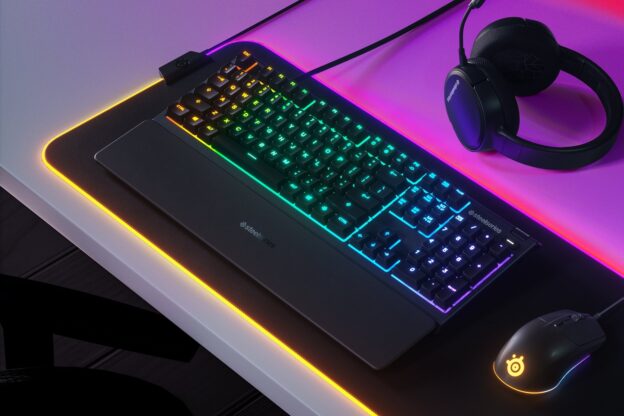
The SteelSeries Apex 3 has a slight edge in build quality. The frame feels more rigid and the included magnetic wrist rest adds comfort that most budget keyboards don’t offer at this price point. The metal volume roller is a premium touch you wouldn’t expect at this price.
The HyperX Alloy Core uses a reinforced plastic frame that feels solid enough for everyday gaming. It’s not flimsy by any means, but it doesn’t have the same premium feel as the Apex 3. That said, HyperX’s build quality is reliable — this keyboard is built to last.
Winner: SteelSeries Apex 3
Switches and Typing Feel
Neither of these keyboards uses mechanical switches — both are membrane keyboards. That’s an important distinction if you’re expecting the clicky, tactile feel of a true mechanical keyboard. What you get instead is a quieter, softer keystroke, which many gamers and office workers actually prefer, especially in shared spaces.
The SteelSeries Apex 3 uses its proprietary Whisper-Quiet switches, rated for 20 million keypresses. They’re smooth, consistent, and nearly silent. The actuation force is light, which suits fast typists and gamers well.
The HyperX Alloy Core’s soft-touch membrane keys feel similar — quiet, slightly spongy, and comfortable for long sessions. The HyperX offering is rated to withstand up to 120ml of liquid spills, while the Apex 3 carries a proper IP32 water and dust resistance rating, making it the safer choice if you’re prone to desk accidents.
Winner: SteelSeries Apex 3 (marginally)
RGB Lighting
Both keyboards offer RGB lighting but they approach it differently.
The SteelSeries Apex 3 has 10-zone RGB illumination and is configurable through SteelSeries GG software. You can set custom colors per zone, apply reactive effects, and sync it with other SteelSeries peripherals. The software support is a big advantage here.
The HyperX Alloy Core has 5-zone RGB plus HyperX’s signature light bar along the bottom edge, which looks great. It comes with six preset lighting effects but has no dedicated software for deeper customization. What you see is what you get.
If lighting customization matters to you, the Apex 3 wins. If you just want it to look good out of the box, both deliver.
Winner: SteelSeries Apex 3
Gaming Performance
For most gamers — especially casual to intermediate players — the performance difference between these two is essentially unnoticeable. Both keyboards feature anti-ghosting and key rollover, meaning you won’t drop inputs even when pressing multiple keys at once.
In raw latency testing the Apex 3 measures slightly lower (around 10.7ms vs 15.3ms for the Alloy Core), but that’s a difference only the most competitive esports players might detect. For the vast majority of gaming scenarios, both keyboards will perform excellently.
Winner: Tie for most users, Apex 3 for competitive gaming
User Reviews and Reputation
Both keyboards have strong track records with real users. The HyperX Alloy Core has accumulated tens of thousands of reviews on Amazon with a consistently high average rating. Buyers regularly highlight the value for money, comfortable keys, and solid build at the price point.
The SteelSeries Apex 3 carries similarly strong ratings, with users frequently praising the wrist rest, the quiet switches, and the overall feel. The consensus is that it punches above its price. Neither keyboard has any widespread reliability complaints.
Price and Value
Both keyboards typically sit in the $35–45 range and frequently go on sale. Given that the SteelSeries Apex 3 includes a magnetic wrist rest (which alone would cost $15–20 separately), it offers slightly better overall value if you can find it at the same price as the Alloy Core.
Check current prices before buying — the gap between them fluctuates regularly and a sale on either can shift the value equation.
Which Should You Buy?
For most buyers, the SteelSeries Apex 3 is the better pick. The included wrist rest, proper IP32 water resistance rating, superior RGB customization via software, and metal volume roller all add up to a more complete package at a similar price.
The HyperX Alloy Core is still a great choice if you find it significantly cheaper, if you prefer HyperX’s ecosystem, or if you simply don’t need the extras the Apex 3 brings.
Either way you’re getting a reliable, comfortable gaming keyboard that will serve you well without breaking the bank.
Frequently Asked Questions
Are these mechanical keyboards?
No — both the SteelSeries Apex 3 and HyperX Alloy Core are membrane keyboards. They use rubber dome switches rather than mechanical switches. If you specifically want a mechanical keyboard, check out our best budget gaming keyboards guide for options under $100 that include mechanical switches.
Is the SteelSeries Apex 3 good for typing as well as gaming?
Yes. The quiet whisper switches make it a good dual-purpose keyboard for both gaming and general typing, especially if you share a workspace with others.
Does the HyperX Alloy Core work with PS4/PS5 or Xbox?
The HyperX Alloy Core connects via USB and will work as a basic keyboard on PS4, PS5, and Xbox, though some lighting and function key features may not work on consoles.
Is the SteelSeries Apex 3 still being made?
Yes — as of 2026 the Apex 3 is still actively sold and supported by SteelSeries. It remains one of their entry-level gaming keyboard offerings alongside the newer Apex 3 TKL variant.
Have you tried either of these gaming keyboards? If so, let me know if the comments what you think. Looking for more keyboard comparisons? Check out our gaming keyboard recommendations page for more head-to-head comparisons across all price points.