
Last Updated: May 2026
If your computer is showing strange behavior — wrong date and time, boot errors, or random hardware issues — a failing CMOS battery could be the culprit. The good news is that it’s one of the cheapest and easiest hardware fixes you can make. In this guide we cover all the signs of CMOS battery failure, how to diagnose it, and exactly how to replace it.
What is a CMOS Battery?
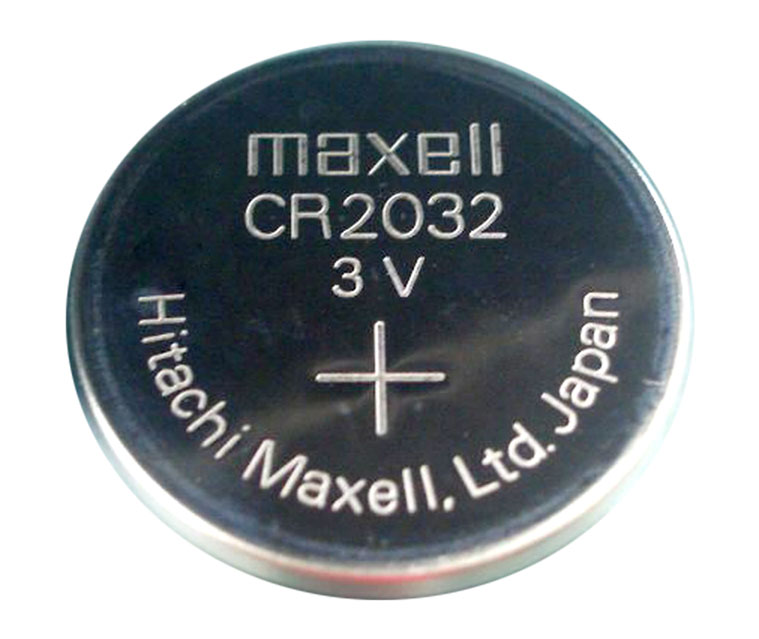
CMOS stands for Complementary Metal Oxide Semiconductor. The CMOS battery is a small, round lithium battery (usually a CR2032) that sits on your motherboard and powers a tiny amount of memory that stores your BIOS settings and system clock — even when your PC is completely powered off and unplugged.
Without a functioning CMOS battery your computer loses its BIOS configuration every time it’s powered down. This causes a range of problems from minor annoyances (wrong date and time) to more serious issues (boot failures and unrecognized hardware).
CMOS batteries typically last 5–10 years, though they can fail earlier depending on how often the PC is used, the quality of the battery, and environmental factors. Older PCs that sit unplugged for long periods drain the battery faster.
Signs of CMOS Battery Failure
1. Incorrect or Constantly Resetting Date and Time
This is by far the most common sign of a failing CMOS battery. If your computer consistently shows the wrong date and time when you boot up — especially if it resets to a default date like January 1, 2000 or similar — the CMOS battery is almost certainly the cause.
You may notice this is fine when the PC is in regular use but the date resets whenever the machine is left unplugged for a few days. That pattern is a strong indicator the battery is weakening rather than completely dead.
2. BIOS Settings Keep Resetting
The CMOS battery stores your BIOS configuration. If you’ve customized settings like boot order, CPU overclocking values, or fan curves and they keep reverting to defaults after every shutdown, a failing CMOS battery is likely the cause.
3. CMOS Checksum Error or CMOS Read Error at Boot
If you see error messages at startup such as “CMOS checksum error”, “CMOS read error”, “CMOS battery failure”, or “System CMOS checksum bad — Default configuration used”, these are direct warnings from your BIOS that the CMOS battery is failing or has failed.
These errors usually appear before Windows loads and may require you to press F1 or F2 to continue booting into Windows with default BIOS settings.
4. PC Won’t Boot or Has Trouble Starting
A severely depleted CMOS battery can prevent your computer from booting at all, or cause intermittent boot failures where the PC powers on but gets stuck before loading the operating system. This happens because the BIOS can’t load its stored configuration.
5. Hardware Not Being Recognized
Since the CMOS stores information about connected hardware, a failing battery can cause your PC to lose track of connected devices. Symptoms include your mouse, keyboard, or other peripherals not being recognized at startup, or your PC failing to detect storage drives.
6. Random System Crashes or Instability
In some cases a dying CMOS battery causes general system instability — random crashes, blue screens, or freezes. This is less common and harder to diagnose as CMOS-related since many issues can cause crashes, but if combined with other symptoms on this list it’s worth investigating.
7. Beeping Sounds at Startup
Some motherboards emit a series of beeps (POST beep codes) to indicate hardware issues. A pattern of beeps at startup combined with other CMOS symptoms can indicate battery failure. Check your motherboard manual for specific beep code meanings.
How to Diagnose a Failing CMOS Battery
Before replacing the battery, you can confirm it’s the problem with a simple test. Enter your BIOS settings on startup (usually by pressing F2, F10, Delete, or Esc during boot — the key is shown briefly on screen), set the correct date and time, save and exit, then shut the PC down completely and unplug it for 24–48 hours.
When you power it back on, check the date and time. If they’ve reset, the CMOS battery has failed. If they’re still correct, something else may be causing your symptoms.
You can also test the battery directly with a multimeter. A healthy CR2032 CMOS battery should read around 3 volts. Anything under 2.5 volts and replacement is recommended. Anything under 2 volts and the battery has effectively failed.
How to Replace a CMOS Battery
Replacing a CMOS battery is one of the easiest hardware repairs you can make — it takes about 10 minutes and costs under $5.
What you need: A replacement CR2032 battery (the most common CMOS battery type). Verify your existing battery type before buying — look for the model number printed on the battery itself, usually CR2032, CR2025, or CR2016. CR2032 is used in the vast majority of desktop and laptop motherboards.
Step 1 — Prepare the PC Shut down the computer completely, flip the power switch on the back of the PSU to off (if present), and unplug the power cable from the wall. Press the power button once to discharge any residual electricity in the system.
Step 2 — Open the case For a desktop, remove the side panel (usually two thumb screws on the back). For a laptop, you’ll need to remove the bottom panel — consult your laptop’s manual or a YouTube tutorial specific to your model.
Step 3 — Locate the CMOS battery The CMOS battery looks like a large, shiny coin and sits in a circular holder on the motherboard. It’s usually easy to spot — silver, round, about the size of a 5 cent coin.
Step 4 — Remove the old battery Most CMOS batteries clip into a holder with a small retention tab. Use your fingernail or a small flat-head screwdriver to gently press the tab and the battery will pop out. Be careful not to scratch the motherboard.
Step 5 — Insert the new battery Snap the new CR2032 battery into the holder with the positive (+) side facing up. It should click into place.
Step 6 — Reassemble and boot Replace the case panel, reconnect the power cable, and power on the PC. Enter BIOS setup (F2 or Delete at boot), set the correct date and time, save and exit. Your CMOS settings are now stored on the fresh battery.
How Much Does a CMOS Battery Cost?
A CR2032 replacement battery costs between $1 and $5 depending on brand. Energizer and Panasonic are reliable brands. You can find them at pharmacies, grocery stores, electronics stores, and online. A pack of two or three is often the same price as a single, so it’s worth buying a small pack.
Frequently Asked Questions
How long do CMOS batteries last? Most CMOS batteries last between 5 and 10 years under normal conditions. If your PC is frequently left powered off and unplugged for long periods, the battery drains faster.
Can a CMOS battery failure damage my PC? No — a dead CMOS battery won’t damage your hardware. It only affects stored BIOS settings and the system clock. Your data, operating system, and components are unaffected.
Will replacing the CMOS battery delete my files? No. The CMOS battery has no connection to your storage drives or data. Your files, Windows installation, and programs are completely unaffected by replacing it.
Do laptops have CMOS batteries? Yes, most laptops have a CMOS battery, though on some modern thin laptops it may be soldered to the motherboard rather than in a removable holder. For laptops, check a YouTube tutorial specific to your model before attempting replacement.
What if the problem persists after replacing the CMOS battery? If the date and time still reset after installing a new battery, the issue may be with the battery holder on the motherboard (a broken retention clip), or a deeper motherboard issue. Check that the new battery is seated firmly and making good contact.
I agree, your specified first sign of CMOS battery failure is the most common issue. Thanks for sharing this very useful information.
I am having problems with my computer losing the time and date every time we have a power failure. Since I live in Maine and am in the country we have a lot of short power failures and then my computer becomes stupid until the ISP up dates the date. Your explaniation of what hapens when the CMOS battrty has failed or is failing is exactly what is happenong and I do have lots of 2032 batterys aound since it is uaed in a lot of my stuff, ie. bathroom scale, watch etc.etc.etc. HP went into a major program to try and tell me what was wrong and wanted money to tell what was wrong and how to fix it, I didn’t believe her and then found you. Why is the internet so difficule to give up simple info. Just want to sell stuff and earn a livins, I guess.