
Last Updated: May 2026
If you’re building or upgrading a gaming PC, a sound card probably isn’t on your parts list — and for most people that’s completely fine. Onboard audio has improved dramatically over the past decade. But there are specific situations where a dedicated sound card or external DAC/amp genuinely makes a difference. This guide explains exactly when you need one and when you don’t.
What is a Sound Card?
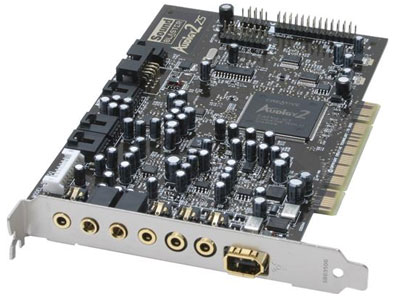
A sound card is a dedicated audio processing component that handles digital-to-analog conversion (DAC) — turning digital audio data into the analog signal your headphones or speakers need to produce sound. Every motherboard includes basic onboard audio that does this job. A dedicated sound card does it with higher quality components, lower noise, and more processing power.
There are two main types in 2026:
Internal sound cards — PCIe cards that install inside your PC. The Creative Sound BlasterX AE-5 Plus and ASUS Xonar AE are popular examples. Handle audio processing inside the case.
External DAC/amps and USB sound cards — devices that sit on your desk and connect via USB. Examples include the FiiO K3, Schiit Modi/Magni, and the Sound Blaster X4. These are increasingly popular because they sit outside the electrically noisy PC environment.
The Case Against Needing a Sound Card
For most gamers in 2026, onboard audio is good enough. Here’s why:
Motherboard audio has improved significantly. Modern mid-range and above motherboards — particularly those with Realtek ALC1220 or ALC4080 codec chips — deliver clean, low-noise audio that rivals entry-level dedicated sound cards. If your motherboard shipped with a good audio codec it’s likely performing adequately.
Gaming headsets handle their own audio processing. Most gaming headsets with USB connections include their own built-in DAC — the Logitech G Pro X with its USB sound card, the HyperX Cloud II with its hardware 7.1 box, and the SteelSeries Arctis Nova Pro with the GameDAC Gen 2 all process audio independently of your motherboard. A dedicated sound card adds nothing here.
Software virtual surround has improved. Windows Sonic, DTS:X, and Dolby Atmos for Headphones all run in software without dedicated hardware and deliver effective spatial audio for gaming at low or no cost.
Most gaming headsets under $100 don’t reveal the difference. The audio components in budget to mid-range gaming headsets are the limiting factor — not your motherboard’s onboard audio. Upgrading the sound card with a $50 headset is improving the wrong component.
When a Sound Card Actually Makes a Difference
You use high-impedance headphones (150+ ohms)
This is the clearest use case. High-quality audiophile headphones like the Sennheiser HD 600 (300 ohms) or Beyerdynamic DT 990 Pro (250 ohms) require more power to drive than a motherboard’s headphone jack can cleanly provide. Plugging high-impedance headphones directly into motherboard audio results in low volume, weak bass, and distortion. A dedicated headphone amplifier — either standalone or combined with a DAC — is genuinely necessary here.
You’re using studio monitors or quality desktop speakers
High-quality speakers reveal the noise and interference present in cheaper onboard audio circuits. Dedicated sound cards sit in their own shielded environment away from GPU and CPU electrical interference. If you hear a hiss, buzz, or whine from your speakers — particularly one that changes with GPU load — this is electrical interference from your motherboard and a dedicated sound card or external DAC will fix it.
You experience electrical interference noise
Described above — if you hear coil whine, buzz, or static that changes with system load, it’s EMI (electromagnetic interference) from other components bleeding into your onboard audio. An external USB DAC eliminates this completely since it processes audio outside the PC case.
You do audio production or content creation
For recording, mixing, or professional audio work a dedicated audio interface is the right tool — not a gaming sound card. The Focusrite Scarlett 2i2 is the standard recommendation for streamers and podcasters who need clean microphone input and monitor output.
You want the best possible gaming audio from premium headphones
If you’re using a high-end open-back headphone like the Sennheiser HD 660S or Audeze LCD-1 for gaming, an external DAC/amp like the FiiO K5 Pro or Schiit Magni/Modi stack will reveal the full capability of those headphones. This is the audiophile gaming use case — a niche but legitimate one.
Recommended Options If You Do Need One
External USB DAC/Amp (best for most users): FiiO K3 (~$80) — compact, USB powered, drives most headphones well. Good entry point. Schiit Fulla (~$100) — American-made, excellent build quality, clean sound. FiiO K5 Pro (~$150) — more power for high-impedance headphones, desktop form factor.
Internal PCIe Sound Card (best for speaker setups): ASUS Xonar AE (~$60) — solid audio quality, low noise floor, good for speakers. Creative Sound BlasterX AE-5 Plus (~$150) — premium option with headphone amp and RGB.
Gaming-focused external DAC: SteelSeries GameDAC Gen 2 (included with Arctis Nova Pro) — best gaming-specific DAC available, built specifically for competitive audio. Creative Sound Blaster X4 (~$100) — USB, virtual surround, headphone amp, good all-rounder.
Quick Decision Guide
| Situation | Do You Need a Sound Card? |
|---|---|
| Gaming headset under $100 via 3.5mm | No |
| Gaming headset with USB connection | No — it has its own DAC |
| Hearing buzz/hiss from speakers or headphones | Yes — external USB DAC fixes this |
| High-impedance headphones (150+ ohms) | Yes — need a headphone amp |
| Budget motherboard, want better audio | Maybe — upgrade motherboard first |
| Audio production or streaming | Yes — get a dedicated audio interface |
| Premium audiophile headphones for gaming | Yes — DAC/amp stack recommended |
Frequently Asked Questions
Does a sound card improve gaming performance?
No — audio processing has negligible impact on gaming frame rates in 2026. A sound card improves audio quality but won’t improve FPS or reduce input lag.
Is onboard audio good enough for gaming in 2026?
Yes for most setups. Motherboards with Realtek ALC1220 or ALC4080 codecs deliver clean audio for gaming headsets under $150. Only specific situations — high-impedance headphones, electrical interference, or premium audiophile headphones — justify a dedicated sound card.
What’s the difference between a sound card and a DAC/amp?
A sound card handles digital-to-analog conversion and may include an amplifier. A standalone DAC/amp separates these functions — a DAC converts the digital signal cleanly, an amp drives your headphones to full volume and quality. Standalone DAC/amp combos are generally preferred over internal sound cards for headphone use.
Will a sound card fix my microphone quality?
No — a sound card doesn’t improve microphone input quality for headsets. For better microphone quality consider a headset with Blue Voice or ClearCast technology, or a dedicated USB microphone like the Blue Yeti. For professional microphone input you need an audio interface not a sound card.
What do you think? Do you use a dedicated sound card? If so, let me know in the comments!
How does this apply if you have hdmi out from the PC into a receiver? Would a sound card still make any difference, or is this just pass-through to the receiver for processing?